Plan like a daydreamer. Teach like a problem-solver.
Lesson plans tied to your standards, a class board that switches with the bell, worksheets, hall passes and more, all in one calm, organized place.
14-day free trial, then $10 a month or $100 a year. Cancel anytime. Student names are optional and encrypted on your device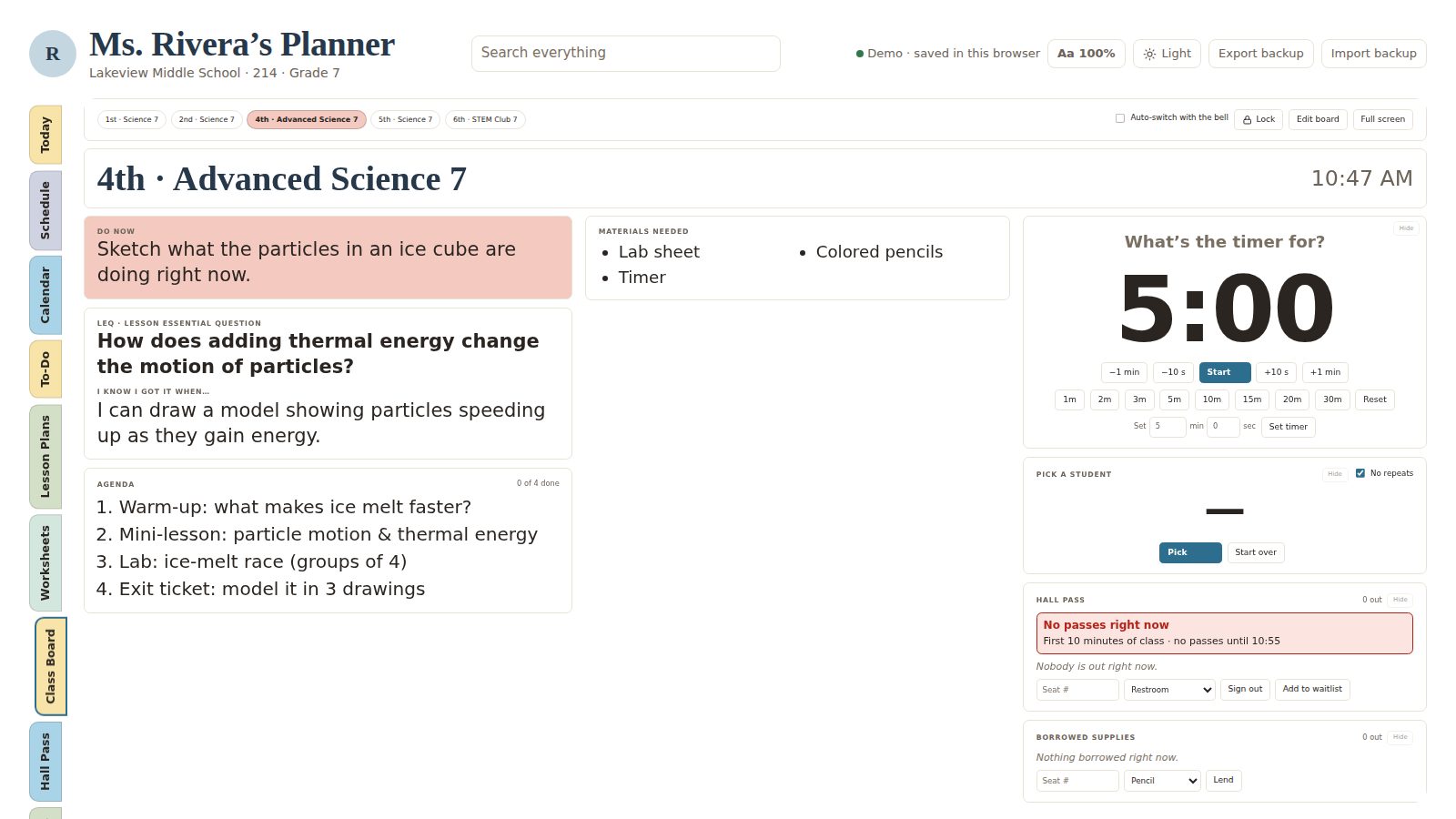
Built by a teacher who got tired of seven tabs.
Lesson plans + standards
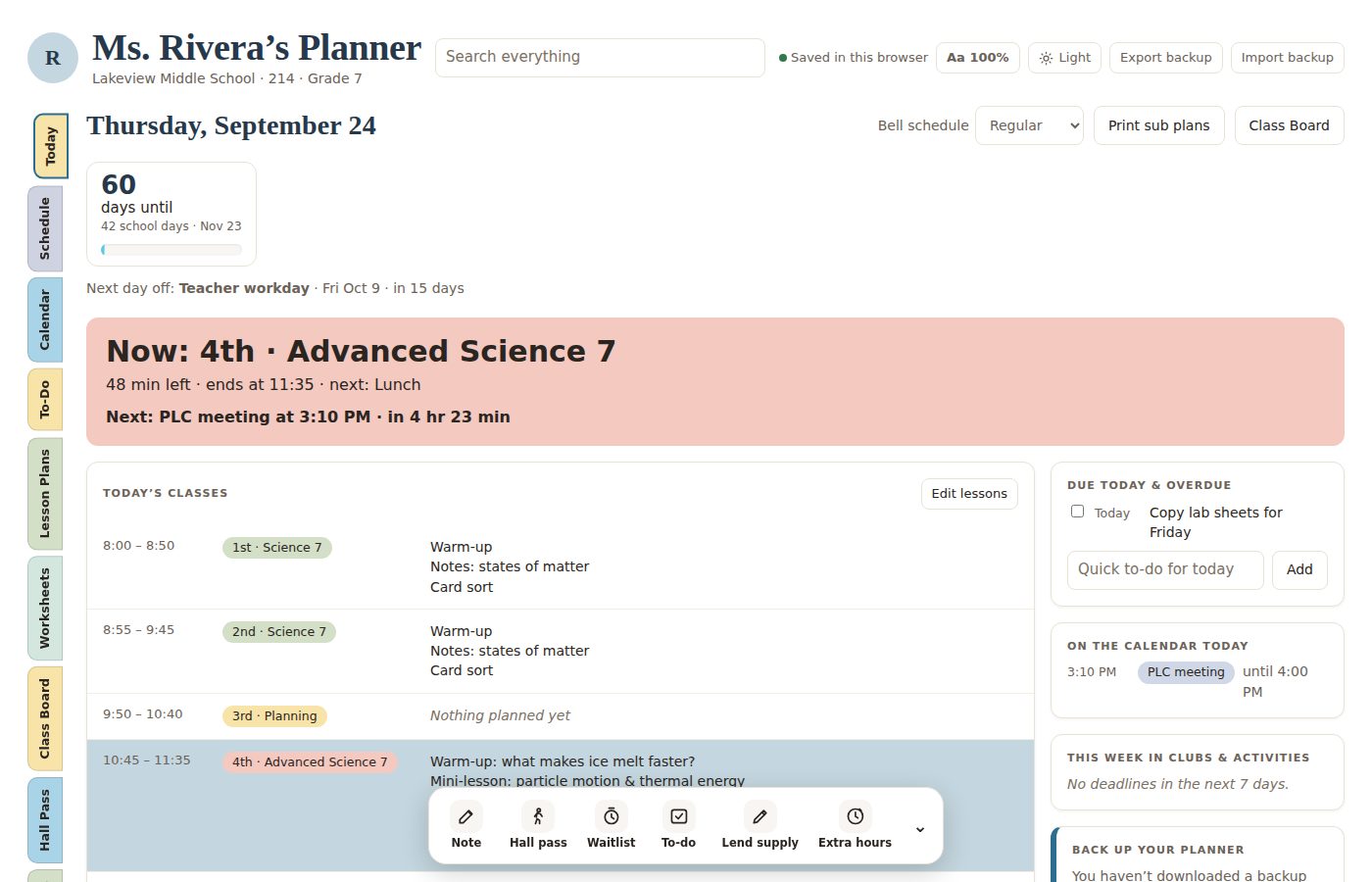
Plan across days, tag your standards, and see which ones you haven’t taught yet.
A class board that keeps time
Do-now, essential question, agenda, exit ticket, timer and music on your projector. Load a whole year of bellwork once, and it switches to the next class right at the bell.
Worksheets & reading units
Build worksheets with answer keys, print graphic organizers or upload your own, annotate passages on the board with pen and highlighter, and print it all.
Hall pass & waitlist
By student number or desk number, or by name if you turn on encrypted names. It warns you in the first and last minutes of class and tracks average restroom time.
A calendar that knows your school
Your bell schedules, early releases and breaks. Multi-day plans skip days off, and countdowns stay right.
The little things, handled
Seating charts, quick buttons, reminders, tomorrow at a glance, extra-duty hours, a board lock and a trash can for oops moments.
Your school, your schedule, your standards.
- Your dayType your periods and bell times, or fill them in with one click.
- Your standardsPick your state, grade and subject. Your standards are suggested for you.
- Your calendarAdd days off and early releases once, and everything plans around them.
- Your lookChoose from over 30 color palettes, or make your own.
Start with your state’s standards already loaded.
Tag them in lesson plans and track what you’ve taught. Don’t see yours? Paste them in, one per line.
Florida
B.E.S.T. English Language Arts and the 2025 Social Studies standards for every grade, K–12, in the official wording with clarifications. Math and science are on the way.
Common Core & NGSS
Math and ELA for grades 6–8, literacy in history and science, and middle school science.
Any other standards
Paste your district’s or school’s standards once, and they’re ready to tag in every plan.
Student names are encrypted. Even we can’t read them.
Everything works with student numbers. If you’d rather see names, they’re locked with a passphrase only you know before they ever leave your device.
One planner. Every tool. Pick how you pay.
Every plan starts with a 14-day free trial. Keep it as long as you teach, and cancel anytime.
- Every feature, on every device
- Your plans synced to your account
- Built-in standards, or paste your own
- Cancel anytime
- Everything in monthly
- Save $20 a year
- One payment, the whole school year covered
- Cancel anytime
Try everything free for 14 days. Payments after the trial are non-refundable, so cancel before your trial ends if it isn’t for you. Terms
Questions
Does it work on my Promethean, SMART board or projector?
Yes. Open the planner in the browser on your classroom screen, sign in, and put the Class Board in full screen. Then run it from your laptop or phone: sign students out, change the agenda or start the next class, and the classroom screen updates within seconds. A PIN lock keeps students from changing anything on the touchscreen.
How do I add student names?
Go to Classroom → Class list. Create a passphrase (one time), then paste or type your students for each class, one per line, and tap Save. Only a first name and last initial are kept, and names are encrypted so only you can read them. Names then show on your seating chart, hall passes and student picker. You can also skip names entirely and use student numbers.
Does it work for elementary teachers?
Yes. In setup, choose One class all day. Your day is split into subject blocks (Reading, Math, Specials…) with one shared class list. The Class Board adds a picture-based Now & Next, a morning meeting card with today’s special, a class jobs chart, a whole-class goal, brain breaks and centers that rotate when the timer ends. Try the 2nd-grade sample classroom.
Which standards are included?
Florida B.E.S.T. ELA and Florida Social Studies (2025) for grades K–12, including high school U.S. History, World History, Civics, Economics, Financial Literacy, Psychology and more. Also Common Core Math and ELA for grades 6–8, literacy in history and science, and NGSS middle school science. You can paste any other standards in, one per line.
What happens after the free trial?
Your monthly or yearly subscription starts automatically unless you cancel first. It keeps renewing for as long as you want it. You can cancel anytime from Settings → Manage subscription.
Do I need to enter my students?
No. Everything works with student numbers. If you’d like to see names, you can turn on encrypted names in Settings. They’re locked with a passphrase only you know, and hall passes and logs save each name encrypted alongside the student number.
Can Classroom Daydream see my students’ names?
No. Names are encrypted in your browser with a key made from your passphrase, and the passphrase is never sent to us. We store only scrambled text we have no way to unlock. That also means we can’t recover names if you lose both your passphrase and your recovery code.
What if I cancel?
You can still sign in and download everything. Your planner becomes view-only until you come back.
Do you offer refunds?
No. Classroom Daydream is a digital product, and the free trial lets you try every feature first, so all payments are final. To avoid a charge, cancel before your trial ends or before your next renewal. See the terms for details.